

During its developer conferene f8 on the 21st of April, Facebook presented Open Graph. But what is it exactly and what can I, as awebmaster, do with it? This and more will be clarified in this article (read german version).
What is Open Graph?
Facebook describes itself as a social graph (social network). Within Facebook, people organize themselves to communities of interests, commune together and much more. This social network can also be represented graphically. A simplified version of a social network illustration within Facebook:
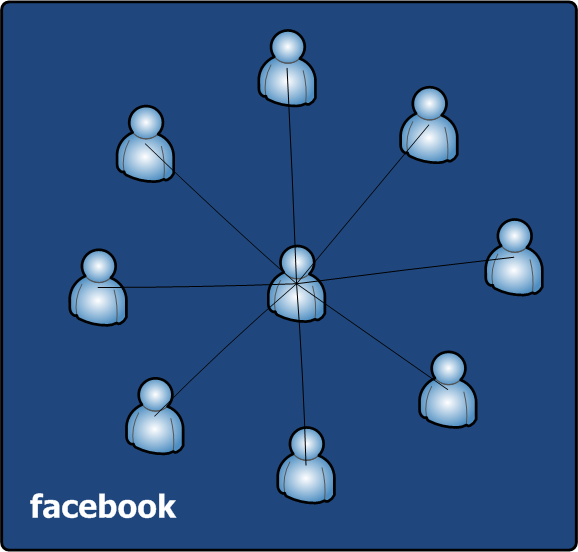
In the middle we can see a single person standing in relations to other people (circle of friends). But we can also see that this social network is limited to Facebook and only relations or friendships between people are allowed. What happens, if you want to display relations to your favorite movie, restaurant or cinema, which are not within the social graph of Facebook? Previously it was simply not possible. But with help of Open Graph, Facebook breaks through its own limitations and expands its social network to all web pages, which do implement the Open Graph Protocol. Thus do not only allow relations between persons, but also to any object from the real world that is represented by a web page:
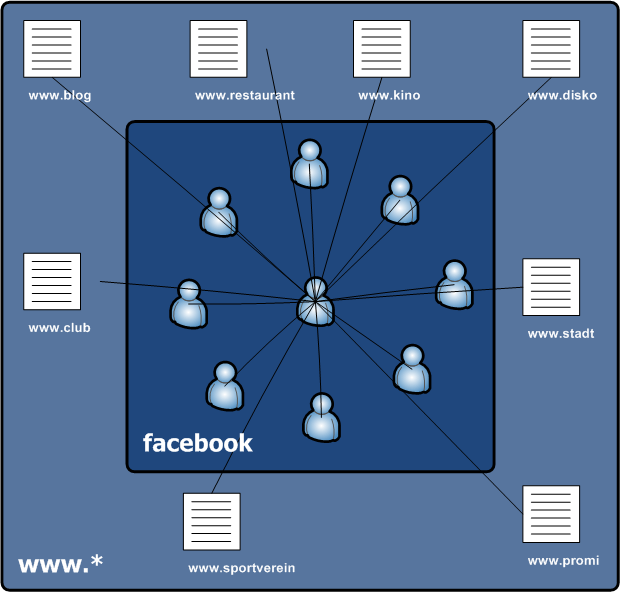
Open Graph therefore primarily is a standardized protocol which allows any web page to become a part of a social network. Currently only Facebook – the initiator of this protocol – has the ability to include Open Graph pages into its social network. Primary the protocol is designed for web pages, which represents objects from the real world (movies, restaurants, places and so on). You can describe your web page very easily by HTML meta tags. For example, Facebook uses this data to display more detailed content:

Simple wall messages with links are provided or it can be determined how many people like the Open Graph page „The Rock (movie)“. Of course there are many other ways to use the collected data. For example, a search for a restaurants will only show restaurants, that my friends also do like.
How to implement this?
The goal of the Open Graph Protocol is that it can be implemented without extensive programming knowledge. So it is really simple: It is just based on HTML meta tags. The easiest way to its implementation would be like this (example from facebook.com):
<html xmlns:og="http://opengraphprotocol.org/schema/"
      xmlns:fb="http://www.facebook.com/2008/fbml">
  <head>
    <title>The Rock (1996)</title>
    <meta property="og:title" content="The Rock"/>
    <meta property="og:type" content="movie"/>
    <meta property="og:url" content="http://www.imdb.com/title/tt0117500/"/>
    <meta property="og:image" content="http://ia.media-imdb.com/rock.jpg"/>
    <meta property="og:site_name" content="IMDb"/>
    ...
  </head>
  ...
</html>
The five meta tags og:title, og:type, og:url, og:image and og:site_name are required. At this point it is noted that the documentation on Facebook differs from the Open Graph documentation. The Open Graph documentation only describes four meta tags as a requirement – og:site_name is not applicable. In doubt, og:site_name should also be specified. In addition to these five (or four) required meta tags, there are much more meta tags available to describe a web page more in detail. For example, geographic coordinates for locations, contact information such as an address or a telephone number. A detailed description of the required and optional meta tags can be found in the documentation of the Open Graph Protocol.
In order for Facebook to evaluate the meta-information, the social plugin Like Button must be inserted. During the publication of the Open Graph Protocol Facebook also revised the social plugins. You can now easily implement social plugins through an IFrame. In the documentation, Facebook offers informations for each social plugin, like a small WYSIWYG editor which generates the necessary HTML code for its implementation. The implementation by FBML is still possible and should be preferred if you have the Facebook JavaScript SDK already in use. The complete implementation of the Open Graph Protocol for Facebook:
<html xmlns:og="http://opengraphprotocol.org/schema/"
      xmlns:fb="http://www.facebook.com/2008/fbml">
  <head>
    <title>The Rock (1996)</title>
    <meta property="og:title" content="The Rock"/>
    <meta property="og:type" content="movie"/>
    <meta property="og:url" content="http://www.imdb.com/title/tt0117500/"/>
    <meta property="og:image" content="http://ia.media-imdb.com/rock.jpg"/>
    <meta property="og:site_name" content="IMDb"/>
  </head>
  <body>
    <iframe src="http://www.facebook.com/plugins/like.php?href=http%253A%252F%252Fwww.imdb.com%252Ftitle%252Ftt0117500%252F&layout=standard&show_faces=true&width=450&action=like&font&colorscheme=light&height=80" scrolling="no" frameborder="0" style="border:none; overflow:hidden; width:450px; height:80px;" allowTransparency="true"></iframe>
  </body>
</html>
Once the Like Button is clicked on an Open Graph page,an appropriate status message will be send to the Facebook profile of the user. Facebook also evaluates the meta tags and may create an own page which represents the Open Graph page. For more information, refer to Lessons Learnt.
Administration
Open Graph pages can be administered within Facebook. You can see statistics like the number of visitors or you can make Stream Updates. For example, you could send a status message to all fans of an Open Graph page, that there is something new on it. Here you have to note, that this functionallity currently does not exists. Facebook
wants to change this soon.
To administer a Open Graph page within Facebook, the meta tag fb:admins is required. Its value is a comma separated list of user IDs or usernames of the Facebook accounts which are allowed to administer the page. You can administer your pages in Profile – Pages You Admin. Moreover, there is the possibility to admin Open Graph pages with an Facebook app. To do so, the meta tag fb:app_id holds the app ID of your Facebook app.
To prevent misusage, Facebook doesn’t evaluate the meta tags og:title and og:type, if more then 10 people like the Open Graph page. The meta tag fb:admins will only be evaluated conditionally – the first user ID can not be changed. You should know, that Facebook needs up to 15 minutes to update all the meta tags after a change.
Lessons Learnt
If you are webmaster of a well-known page you should consider very carefully whether you want to implement the Open Graph Protocol. Especially if you already have a fan page for your page on Facebook. Because Facebook creates special pages for Open Graph pages, which competes to your fan page. This competition may also exist for your real page, when Facebook pages appear before your page in resultsets of search engines, provided that the Facebook pages are available for search engines.
Somewhat annoying is the poor documentation and improper implementation of Open Graph by Facebook. The examples referred in the documention are not always clear and the administration for Open Graph pages does not work at the time of writing this article. Overall it feels a little bit half-baked.
Also the issue of privacy is not taken seriously enough. Because with the help of Open Graph, Facebook is able to study the browsing habits of its users even better. The mere implementation of the Open Graph Protocol is enough to tell Facebook, when and how often pages were accessed.
Conclusion
Open Graph has a lot of potential, which unfortunately is only limited available. Indeed it provides excellent opportunities to increase the awareness of one’s website dramatically and addessing target groups directly, but these options are obviously limited to Facebook. It would be desirable, that other social networks and online communities would use the new protocol. However, we should not write off Open Graph because of the lack of acceptance and the aforementioned issues. It is still in its beginnings and we will see what the future brings.


Schreibe einen Kommentar